Register now, make more friends, enjoy more functions, and let you play in the community easily.
You need Sign in Can be downloaded or viewed without an account?Register Now 
x
What is?MT5What are the advantages of mobile trading?MT5(MetaTrader 5)It is fromMetaQuotesA multi asset trading platform developed, in addition to supportingforeign exchangeYou can also trade stocks and contracts for difference(CFD)Trading of various assets such as cryptocurrencies. With the popularity of mobile devices,MT5Mobile applications have become essential tools for many traders. Whether on a journey, in the office, or anywhere with internet access,MT5Action trading allows investors to monitor the market and execute trades at any time, providing great flexibility.MT5The core characteristics of mobile trading1. Multi market trading supportMT5The mobile platform supports various financial products such as foreign exchange, stocks, commodities, and cryptocurrencies, allowing investors to easily manage different asset classes. Without the need to install additional applications, you can instantly view market quotes and improve trading efficiency.
2. Built in technical analysis toolsMT5Mobile provided30+Technical indicators coveringKAnalysis tools such as line charts, moving averages, and support pressure levels. Traders can use various time period charts to facilitate short-term or long-term trading decisions.
3. Flexible order and risk managementMT5The mobile platform supports multiple types of orders, including market orders, limit orders, stop loss take profit orders, helping traders execute precise trading strategies. Tracking stop loss can be set to automatically adjust the stop loss point when the market fluctuates violently, reducing risk.
4. Instant push and transaction alertsSet price reminders, once the market reaches a specific price point, the application will immediately push notifications to avoid missing trading opportunities. By using trading alerts, we ensure that we can keep track of market changes even without constantly monitoring the market.
How to start usingMT5Mobile application?1. Download and InstallMT5application programMT5The mobile end can be accessedApp Store(iOS)OrGoogle Play(Android)Free download. After downloading, select the trading platform and enter the trading account information to start trading.
2. Open a simulated or real accountOpen a demo account: For beginners, first use a demo account to practice trading and become familiar with itMT5Various functions can effectively reduce learning costs. Open a real account: Experienced traders can directly open a real account to conduct actual market transactions.
3. Set up trading environmentSet technical indicators, trading varieties, and chart templates to meet individual trading needs. The cloud synchronization function can be used to directly load desktop settings into mobile applications.
MT5The technical foundation of mobile trading1. MQL5Automated tradingMT5adoptMQL5Language enables traders to develop and operateEA(Automated trading system). Even on mobile devices,EAContinuously execute and synchronize to the desktop trading environment.
2. Cloud synchronization and cross platform tradingTransaction data and indicator settings can be synchronized through the cloud, ensuring a consistent trading environment regardless of which device is logged in. MT5Mobile version, desktop version, andWebTrader(Web version) can seamlessly switch, improving transaction convenience.
Best practice recommendations for action trading1. Maintain a stable network connectionChoose a stable optionWi-Fior5G/4GNetwork to avoid order execution issues caused by network delays during transactions. It is recommended to test network stability before mobile trading to ensure smooth ordering.
2. Establish a risk control mechanismPre set stop loss and take profit before trading to avoid market volatility affecting investment plans. Do not engage in excessive trading due to the convenience of mobile trading, and execute each transaction with caution.
3. Raise awareness of cybersecurityFrequently Asked Questions(FAQ)Q1: Action versionMT5How is it different from the desktop version?A: The main functions are the same, but the mobile version has a simpler interface, suitable for monitoring the market and quickly executing transactions at any time. Q2: I canMT5Mobile usageEAIs it?A: Yes, although the mobile version cannot be directly writtenEA, but can execute the settings already set on the desktopEAStrategy. Q3: MT5How to set up push notifications for mobile devices?A: Price reminders can be set within the trading platform, and notifications will be automatically sent when the market meets specified conditions. Conclusion:MT5The Value of Action TradingMT5Mobile applications provide investors with an efficient and flexible trading environment, offering great convenience to both short-term and long-term traders. Through real-time market monitoring, technical analysis tools, and automated trading functions,MT5Mobile devices have become an indispensable tool for market traders. However, while enjoying the convenience of mobile trading, it is still necessary to pay attention to risk management and trading discipline to ensure that investment strategies can be executed steadily.
|


 黄金暴跌,黄金高波动行情交易技巧
11month16日周一,国际现货黄金短线大跳水,最新价位低至3832dollar/盎司,走势偏承压回落
 Aurra Markets:【白银走势展望】收
供应偏紧,为何白银仍表现疲软?受鹰派利率环境影响,白银正面临沉重的抛售压力,价
 Aurra Markets:AI 行业承压,Anthro
Anthropic IPO 能否重振 AI 行业?AI 行业近期接连遭遇挑战,Anthropic 即将启动的
 伦敦金一手保证金是多少?
伦敦金属于保证金交易品种,很多新手都会问伦敦金一手保证金是多少。当前香港现货黄金
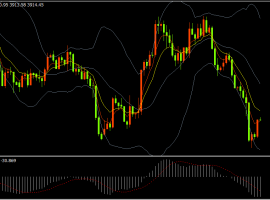 汉声集团:黄金行情跌超100美元,估
昨晚美元延续走强,现货黄金跌破3900At the US dollar level, the lowest is3852.50dollar/盎司,金价最终报收





 Riser card
 Top card
 Silence card
 Color changing card
 lifting jack