Register now, make more friends, enjoy more functions, and let you play in the community easily.
You need Sign in Can be downloaded or viewed without an account?Register Now 
x
Dream Shaping Series-superMT4下单大师安装与功能介绍(获取点蓝字)
​​
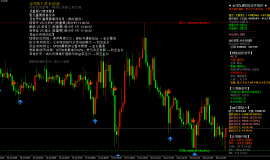
The following image shows our product usage panel. To open the software, we need to do the following preparatory work first.
​
​​
ObtainedEAafter,After copying,From my commonly usedMT4Click on the file in the client,Data folder,clickMQL4file,Click onExpertsPaste the file into it,如下三张图
​
​
​
​
As shown in the following figure:Before opening the Order Master, click on the tool options and see the following image
​
​​
​To check the red circle in the following picture, enter the following three website addresses​

​​​
As shown in the figure below: The automatic transaction key is displayed in green. If it is displayed in red, it will not be opened and will not start!
​
​​​
As shown in the following figure: Before opening,EAtransaction Right click the mouse to refresh, and the ordering master will be displayed
​
​​​
As shown in the following figure: After opening, in the parameters Set it up according to your commonly used varieties and some other functions, and set it up properly You can click to save the file parameters. The next time you open it, you can click to load and select the file you saved before, and the parameters will automatically display your commonly used parameters! One thing to note: Some platform varieties have suffixes after them; For example:EURUSD.s After that.sYou also need to input the suffix!
​
​
​​​
As shown in the figure below, the functions of this section are corresponding to each button function for each variety, such as placing an order, placing an order, closing a position, etc. The button function behind each variety can only control each variety order. Modify the number of hands and variety name freely inside
​
​​
如下图:在下现价单子和挂单之前,设置现价止盈止损和挂单止盈止损,这样下单后单子自动显示好止盈止损,非常方便。包括挂单距离
​
​
​
如下图:下方红圈的位置功能是一键全平上方红圈所有品种的持仓单子以及挂单举例说明:比如通过上方五个品种按钮分别下五个品种单子,那下方点击一键全平,所有持仓的单子就会平掉,如果有五个品种的挂单点击一键平挂单,那挂单全部就平掉。非常方便
​
​​
Special features introduction: news order placement, breakthrough order placement, automatic doubling of hand count after loss, and mobile stop loss function
​
​
1、 News listing function: star rating(4) Time(60)Seconds Turn it off (click on) to turn it on. After turning it on, the software will automatically place an order before the corresponding star news based on the set number of star news and time.​
​The software comes with Today's News, and you can set your own star rating and desired time to place an order based on the software's news data.​
​2、 Breakthrough order placement: You can only enable hanging multiple or only enable hanging empty, or both can be enabled to hang together.The orders placed are all pending orders, in order to better enter the market according to the market situation, they are used in conjunction with pending orders to stop losses and stop gains, as well as pending distance.​3、 Maximum order quantity and multiple investment function for loss doubling investment:Refers to looking at small images​
​​For example, in the following small image:0.1Hand European and American orders, if the loss is balanced, look at the small picture​
​​this0.1Automatically change to the multiple you set, set2Double is becoming0.2You don't have to lose by hand. The maximum order quantity is the maximum number of hands you set, such as setting1Hand. reach0.6After losing money, if you change your hands, you can only change them1.0My hands won't double anymore.​4: Mobile stop loss activation points and mobile point function: For example, set it well(150)Number of startup points and(100)After clicking to turn on the mobile points.goldPoint position1500.00Order placement and stop loss setting1498.00. Up to1501.50Trigger the mobile stop loss function, and the single stop loss point will be based on the set number of mobile points(100)Make changes. That is to say, it has risen to1501.50If callback occurs later1500.50(100Click to automatically sell, rather than in the1498.00卖掉。移动点数设置好会根据现价一直移动​​
Clicking on the platform recommendation is the advertising window for our product.
 If there are any questions andBUGClick on the question mark in the upper right corner of the software Consult our technical personnel to resolve the issueBUGAnd questions!. Our product traders use it permanently for free! If you use it well, you can recommend it to your friends around you. Thank you for your support! There are even higher quality technology products behind the Dream Sculpture series, look forward to them!
​
​​ |
"Small gifts, come to Huiyi to support me"
No one has offered a reward yet. Give me some support
|


 7month10日午后黄金策略:金价回落至411
目前消息面对黄金还是偏压制。市场对美国利率继续维持高位、甚至进一步收紧的预期有
7month10日午后黄金策略:金价回落至411
目前消息面对黄金还是偏压制。市场对美国利率继续维持高位、甚至进一步收紧的预期有
 ZFX山海证券:金价惊险重返4100dollar
7month9日,国际黄金市场上演了一场惊心动魄的逆转大戏。在经历了连续三个交易日的下跌之
ZFX山海证券:金价惊险重返4100dollar
7month9日,国际黄金市场上演了一场惊心动魄的逆转大戏。在经历了连续三个交易日的下跌之
 ZFX山海证券:金价坚守4000Pass!
Wednesday(7month8日)现货黄金价格一度跌至4020美元附近,油价应声暴涨逾5%,刷新逾两周高点
ZFX山海证券:金价坚守4000Pass!
Wednesday(7month8日)现货黄金价格一度跌至4020美元附近,油价应声暴涨逾5%,刷新逾两周高点
 7month9日早上黄金策略:金价深V反弹后
昨晚黄金走了一波急跌,盘中一度逼近4020关口,随后展开深V反弹收复大部分跌幅,最
7month9日早上黄金策略:金价深V反弹后
昨晚黄金走了一波急跌,盘中一度逼近4020关口,随后展开深V反弹收复大部分跌幅,最
 ZFX山海证券:金价被油价大涨压制!
Tuesday(7month7日),油价大幅飙升,现货黄金当日下跌1.42%, receive reports per ounce4105美元,盘中一
ZFX山海证券:金价被油价大涨压制!
Tuesday(7month7日),油价大幅飙升,现货黄金当日下跌1.42%, receive reports per ounce4105美元,盘中一





 Riser card
 Top card
 Silence card
 Color changing card
 lifting jack